







Product Features
Perpetual or Subscription
NEW: Self service License Transfer & License Borrowing option.
DWG, DXF, DWF & BIM
Plus, it also supports dxf, dwf, dgn, pdf and image underlay, sat, dae, svg files and now with BIM support through IFC & RVT/RFA import.
Now also supporting .DWG Digital Signatures, STEP & IGES Import & Export.
New Ribbon Interface
CMS IntelliCAD now includes a new Ribbon interface plus the traditional menu and toolbars that users also consider productive.
Now also including context sensitive menus, menu groups, panel expanders.
Plus, NEW custom tool palettes.
Advanced Customization
ETOOLBOX® Free CAD Viewer
Customized CAD programs
What's new in CMS IntelliCAD 15.0
dwg compatible what is new bim rvt true autocad alternative dwg 2020 Object ARX Revit 2025 .rvt import Ribbon dark theme BIM and Format Updates new VLISP command Esri image mapping Performance Boost Mapping & Geospatial Integration Performance & Security Enhancements Drafting & Block Management BIM Workflows UI & API Improvements ai render lookout pan vlx visual lisp
CMS IntelliCAD 15 Released: AI photo-realistic rendering, Drawing Compare Preview, Ergonomic Navigation Enhancements and Fully Modernized LISP Engine
Azle, Texas – August 27, 2026
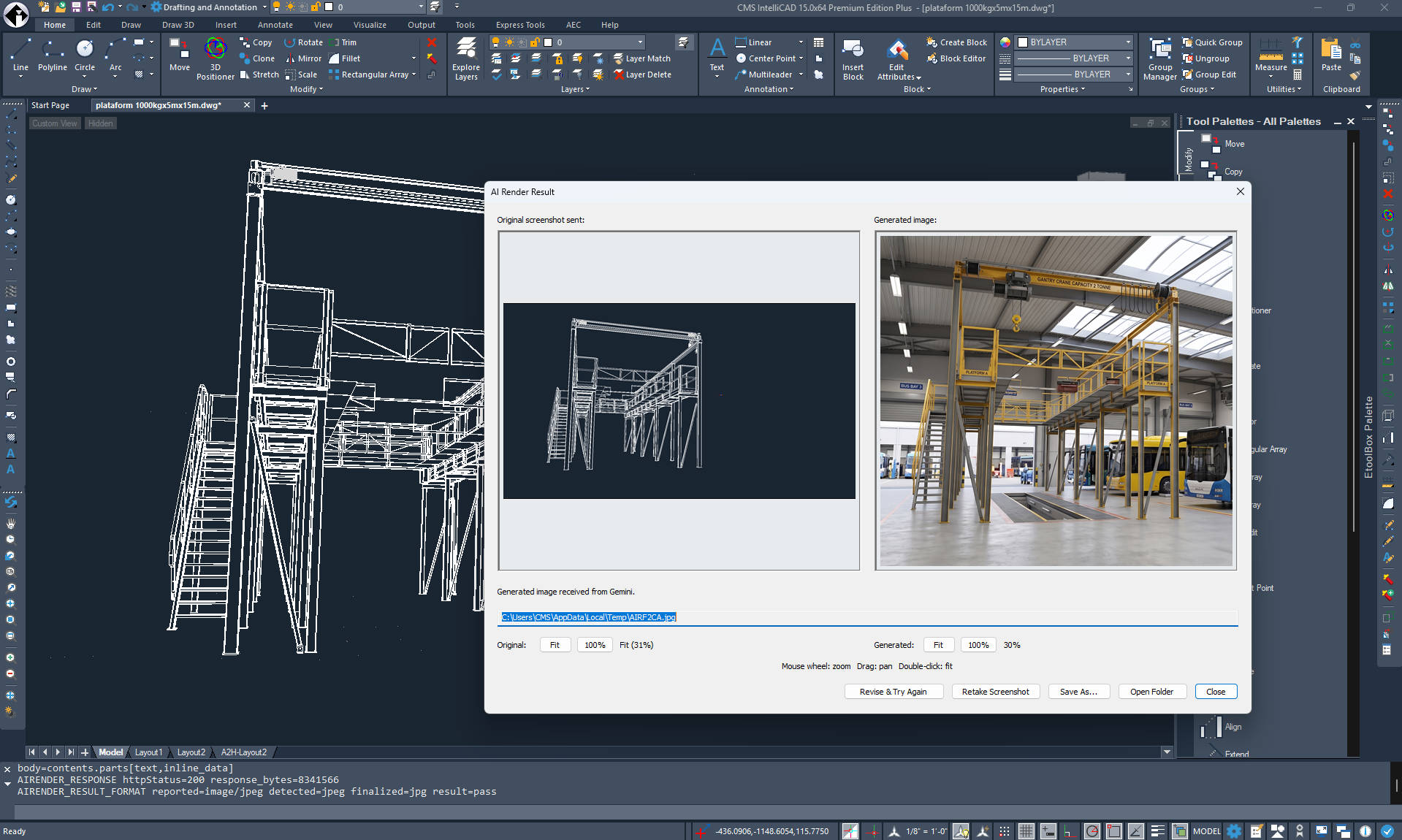
CMS announces the release of CMS IntelliCAD 15, a landmark update that introduces highly anticipated core engine updates alongside two groundbreaking features: the "Lookout" PAN tool and AI Photorealistic Rendering.
Revolutionary patent pending "Lookout" PAN Method
Navigating large and complex CAD environments is now significantly faster and more ergonomic.
- Seamless Workspace Navigation: Traditional panning requires an unproductive "dead-stroke" when moving the mouse back to a neutral starting position. The "Lookout" method wholly resolves this inefficiency by capturing the physical mouse movement in-between standard active PAN inputs and applying an inverse translation to the digital workspace
- Ergonomic Optimization: This effectively doubles the navigational efficiency of the user, allowing them to traverse large CAD drawings in roughly half the time and with half the physical effort required by state-of-the-art systems. It drastically reduces the number of physical clicks and the overall distance the hand must travel, which significantly diminishes ergonomic strain and lowers the risk of repetitive strain injuries.
- Intentionality and Integration: The inverse panning is explicitly invoked via a modifier key (CTRL) combined with standard, non-button-depressed mouse movement. The system is specifically programmed to bypass the "Lookout" feature if the user holds the CTRL key while simultaneously depressing the 3rd mouse button, guaranteeing that pre-existing CAD shortcuts are preserved and remain entirely unaffected.
Instant AI Photorealistic Rendering
CMS IntelliCAD 15 transforms basic CAD designs into breathtaking, presentation-ready visual assets directly from simple text prompts.
- Powered by Google's Gemini AI: Users can skip setting up lights and material nodes by simply describing their vision (e.g., "modern concrete villa at sunset"). This instantly produces high-resolution presentation images in up to 4k.
- Automated Visual Prepping: The smart Auto-Prep feature automatically hides drawing grids, coordinate axes, and menus while capturing clean geometry. This ensures the AI focuses purely on design quality.
- Interactive Conversational Refinement: Users can easily request tweaks like "make the sky cloudier" or "change to wood cladding" in an active chat session. This allows users to perfect their output without starting over.
- Full Privacy & Secure API Control: Users can plug in their own personal or corporate Gemini API key for complete control over usage limits and data privacy preferences.
- Connectivity Note: Please note that CMS IntelliCAD 15 does not have an AI MCP connector.
IntelliCAD 15.0 Key Features & Enhancements
- Drawing Compare (Preview): A new tool to visually compare two drawings. Differences are color-coded (unique objects in red/green, shared in gray), related changes are grouped in revision clouds, and a dedicated toolbar allows you to easily step through and sync differences.
-
Modernized LISP & Developer APIs: Developers can now compile and protect LISP source code into AutoCAD-compatible
.FASand.VLXformats using new tools and wizards. The ActiveX/COM and .NET APIs also received upgrades for deeper access to block properties, table data, and custom palettes. - BIM Improvements: Enhanced workflows now support Revit Type Catalogs, curved wall designs, and improved IFC import for complex wall geometry.
- User Interface Upgrades: Standard versions now include the Ribbon, Quick Access Toolbar, and Start Page by default. The IntelliCAD Explorer features resizable/freezable columns, and the application loader has been redesigned for intuitive navigation.
- Drafting & Tool Enhancements: Everyday commands are smarter, featuring live previews for FILLET and CHAMFER, better entity snap tracking, new Revision Cloud options, and Table AutoFill functionality.
- Printing & Publishing: Users get more flexibility with new print resolutions, additional shade plot styles, and the ability to publish DXF files directly to a list.
- Massive Performance Gains: The new version delivers significant speed improvements, including up to 48x faster VBA iteration through Model Space, 12x faster Undo with VBA, 3x faster compiled LISP execution, and 3x faster loading for large slide images.
- Core Updates: Additional improvements include slide library support for the VSLIDE command, an upgraded ACIS modeling kernel, and updated core libraries.
Free trial available at https://intellicadms.com/download
CMS IntelliCAD 15.0 licenses are available as Perpetual Standalone seats, USB dongle seats, Network floating seats or Renewable Subscriptions.
CMS Software at Your Everyday Working Life
With ETOOLBOX® MOBILE CAD TOOLS you'll keep your drawing files private, secure, and always available. You'll be able to open and view the *.dwg files stored on your mobile device or cloud based folders.
With ETOOLBOX® MOBILE CAD TOOLS , CAD file uploads will not be required.
Read more
Our partners



Meet the CAD-Manufacturing Solutions, Inc. partners – we work with the world's most advanced technology services providers who share our commitment to customer success.
The IntelliCAD® Technology Consortium (ITC) is a group of member companies who share a common goal: to research and develop the IntelliCAD® platform and to deliver high value CAD solutions to customers worldwide. CAD-Manufacturing Solutions, Inc. is one of the major ITC members and sponsors.Spatial Corp. is the leading provider of 3D components for technical application development across a broad range of industries. CMS IntelliCAD® CAD software includes Spatial’s 3D ACIS® Modeler.
Turbo.net is a leading developer of software virtualization and container technology. Available as both a web-based service and on-site server, Turbo.net allows software publishers, enterprises, and schools to build, test, deploy, and manage desktop application containers instantly to any user with an Internet connection. CMS IntelliCAD Easy Run or Cloud version is delivered at end user systems using Turbo.net application streaming technology.
Latests Posts
-
CMS IntelliCAD 15: Ultimate AI Rendering & Ergonomic Navigation
Read more...
August 27, 2026 - Azle, Texas, USA. CAD-MANUFACTURING SOLUTIONS INC. (AKA CMS) announces a New CMS IntelliCAD® 15.0 CAD Software with Ultimate AI Rendering & Ergonomic Navigation
-
CMS IntelliCAD 14.1 is Here
Read more...
April 9, 2026 - Azle, Texas, USA. CAD-MANUFACTURING SOLUTIONS INC. (AKA CMS) announces a New CMS IntelliCAD® 14.1 CAD Software with enhancements and performance boosts
-
The "One-of-a-Kind"
January 20, 2026 - Azle, Texas, USA. Accept no imitations! Great news, team: Our 3D PRINTER TEST BENCH MODEL design is now officially protected by the U.S. Patent and Trademark Office! US patent D1,109,821. This means the look you love is uniquely ours—and yours. We believe in original ideas and bold designs, and today we have the certificate to prove it. Thank you for supporting our journey and valuing true craft!
Get this model at https://cadhobby.com -
New CMS IntelliCAD® 14.0 CAD Software
Read more...
August 14, 2025 - Azle, Texas, USA. CAD-MANUFACTURING SOLUTIONS INC. (AKA CMS) announces a New CMS IntelliCAD® 14.0 CAD Software with enhancements and performance boosts