
CMS IntelliCAD PE Easy Run Registration
QuoteCAD Manufacturing
QuoteCAD™ Manufacturing is the smartest choice for small businesses that require the basic and integrated functions of an Enterprise Resource Planning (ERP) System. QuoteCAD™ Manufacturing provides out-of-the-box, base functions for business areas such as Manufacturing, Customer Relationship Management and Supplier Chain Management.
Both economical, and user friendly, QuoteCAD™ Manufacturing has the lowest learning curve, and it does not require a high degree of customization as found in the majority of existing ERP solutions. Typical ERP implementation projects for enterprises can consumes months, requires a consulting team, and usually requires changes to existing business processes. QuoteCAD™ Manufacturing already fits the basic requirements for small businesses and requires minimal additional setup time.
QuoteCAD™ Manufacturing development continues, and the next version will support third-party built-in applications that will expand QuoteCAD™ software features. QuoteCAD™ Manufacturing will grow along your business. Future releases will be made available through an upgrade purchase.
QuoteCAD Manufacturing software is divided in 2 main installer files. The main QuoteCAD application installer file and the QuoteCAD Database SQL server installer.
QuoteCAD Manufacturing needs to be installed on the user machine. It cannot be installed on a server and deployed over the network.
QuoteCAD database SQL server can be installed as standalone or on a LAN windows server or machine and therefore centralizing database information. Installer file includes a sample products database as assistant tutorial, that can easily be deleted as well.
QuoteCAD Manufacturing can be used as a time-limited trial. If you have already purchased a license, please refer to the “QuoteCAD Registration Instructions” for additional information. These instructions are available at the DOWNLOAD section of this website.
Free Download QuoteCAD Manufacturing QuoteCAD Brochure Visit QuoteCAD website
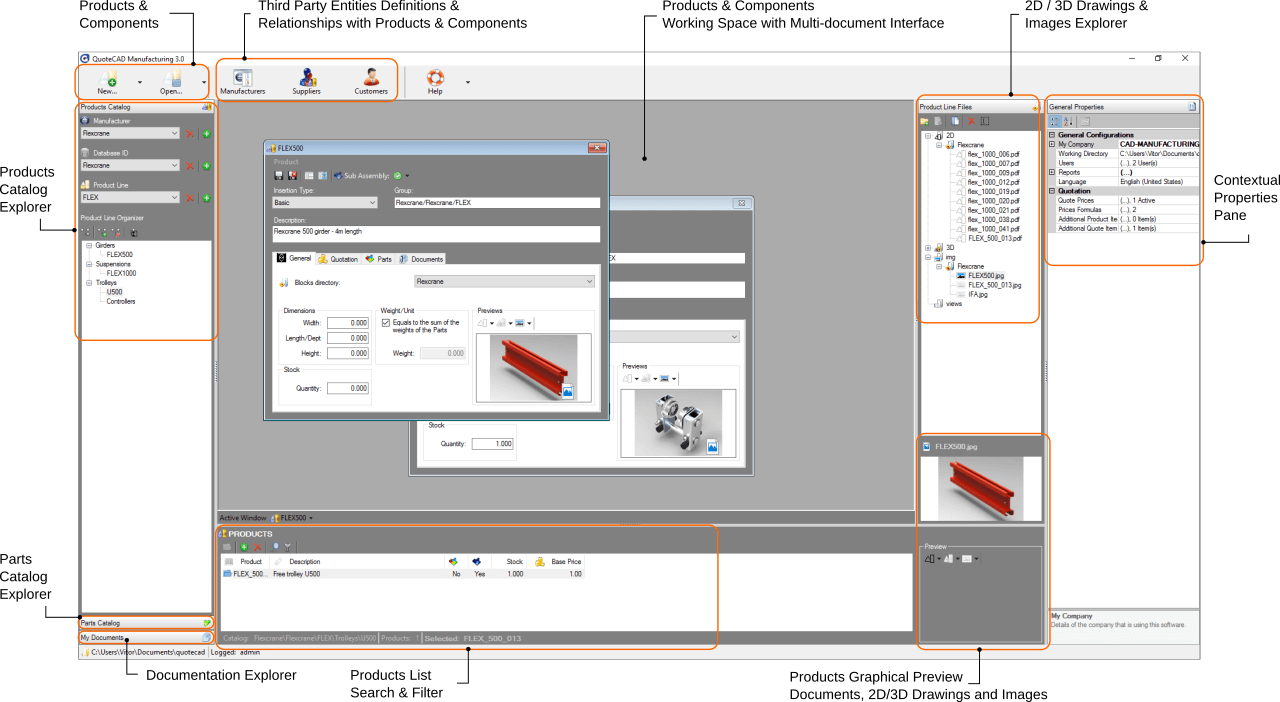
QuoteCAD™ Manufacturing User Interface

What does QuoteCAD™ Manufacturing provide?
- Access control - Management of user privileges for various processes
- Custom product structures based on sub-products, components and services assemblies, in-house built or supplied by multiple vendors.
- Import components data from external sources as *.csv file.
- Link extra information with products, components or services, like CAD drawings, datasheets, images or catalogs.
- Clean and transparent drag and drop simple working operations.
- Multiple price configuration levels.
- Multiple customer and vendor management.
- Custom reports (quotes, orders, Bill of materials).
- Highly customized and easy to use product and quote items (taxes, discounts, shipping prices, etc.).
- Multiple document interface - MDI.
- Products groups and nested products in price quotes.
- Secondary currency in price quotes.
- Visual real-time calculation of the stock quantities, considering pending orders in to calculations.
- Visual warnings of stock status.
- Customer Orders and Purchase orders (products or parts) management.
- Bill of Materials.
- Stock Management, products and parts real-time inventory.
- Instructions manual, online tutorials and online bug reporting system.
- Multi-Language support: EN, FR, DE, ES, IT, PT, PL, JP, ZH-Hans.
- Supported OS: Windows XP / VISTA / 7 / 8.x / 10 | 32-bit & 64-bit | HD 335Mb | RAM 120MB
QuoteCAD™ Manufacturing DataBase Manager User Interface
Modifying Polylines
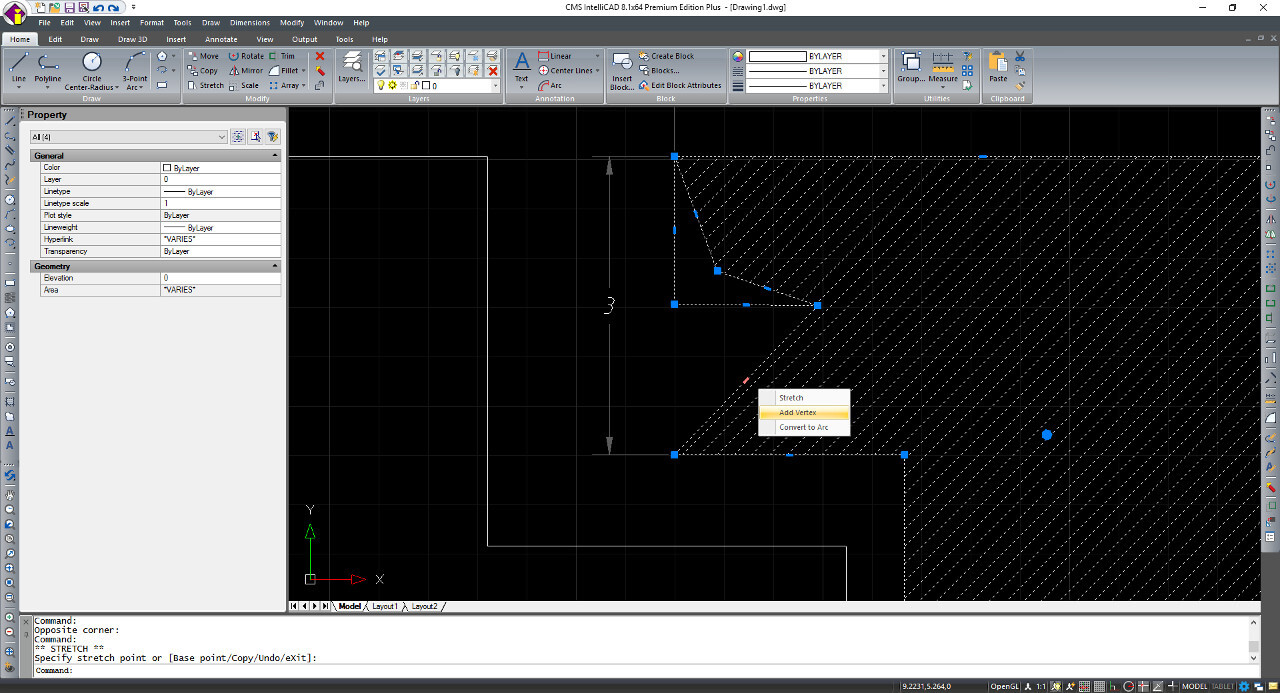
Starting from CMS IntelliCAD 8.1 is also able to modify polylines entities by stretching grip points, adding or removing vertices, converting a line segment to an arc segment and , reversely, converting an arc segment to a line.
CMS IntelliCAD

CMS IntelliCAD® is designed for anyone who wants a fast and efficient CAD program with all the power and versatility of standard programs such as AutoCAD® by Autodesk®, Inc., or MicroStation® by Bentley Systems, Inc., at an affordable price. Using today’s advanced technology, CMS IntelliCAD integrates the Microsoft® Windows® interface with a powerful CAD engine.
How compatible is CMS IntelliCAD® with AutoCAD ® and .dwg files?
CMS IntelliCAD® provides unparalleled compatibility with AutoCAD®, using most of the same file formats including those for drawings (.dwg files), commands, linetypes, hatch patterns, and text styles. Users can also use AutoCAD menu files and run Autodesk® AutoLISP® programs. Custom ADS (Autodesk® AutoCAD Development System®) programs can be simply recompiled to link with the IntelliCAD libraries. Many third-party ADS programs already support IntelliCAD. If you have a program that is not already supported, ask your software vendor to provide an IntelliCAD-compatible version of the program.
CMS IntelliCAD® is more compatible with the AutoCAD® program than any other CAD product, delivers additional tools with advanced CAD features, and has a seamless Microsoft® Windows integration. This powerful program provides a superb combination of features for CAD users like architects, engineers, and designers.
CMS IntelliCAD® incorporates standard features found in other CAD programs, along with features and capabilities you won’t find anywhere else. Its multiple-document interface (MDI) lets you open and work with several drawings at the same time. You can easily copy drawing entities between drawings. In addition, the powerful IntelliCAD Explorer lets you manage information and settings and quickly copy layers, linetypes, and other information between drawings.CMS IntelliCAD is the best Autodesk AutoCAD® alternative in the market.
Using AutoCAD® legacy drawings and Extended File Compatibility
CMS IntelliCAD® fully supports AutoCAD® legacy drawings. CMS IntelliCAD® reads and writes .dwg files in their native format without any loss of data, from the most advanced AutoCAD® *.dwg file version back to version 2.5, including AutoCAD LT®. Because CMS IntelliCAD® uses Autodesk® DWG® format as its native file format, no translation is required. Now also providing Bentley Microstation® *.dgn file support.
Learn CAD for Free with CMS intelliCAD Basic Course. 13 main lessons containing 31 video files in total so that all users can get started with CMS IntelliCAD software are now available at the download section of https://intellicadms.com website. Approximately 1 hour and 45 minutes of total video time containing additional exercises and tasks. It is expected that each trainee will require approximately 9 hours of training to acquire these basic level skills.
Free Download CMS IntelliCAD® Download CMS IntelliCAD® brochure What's new in CMS IntelliCAD Compare CMS IntelliCAD versions with AutoCAD® Learn CAD Here
More licensing options! Securely, Download & Run CMS IntelliCAD® PE Anywhere* locally at your PC .
CMS, Inc. also delivers CMS IntelliCAD CAD Software using the most advanced application streaming technology into the CAD industry. We are a pioneer CAD company making this technology available.
With application streaming technology users can quickly load and seamlessly run CMS IntelliCAD® PE - Premium Edition - locally at an user system without performance degradation.
Sign in, download it once, and run. Anywhere*. That's it.We believe that common cloud technology, i.e., typically running a software inside a browser window, has some important barriers still difficult to overcome, specially with CAD applications. Manly they are internet connection speed and performance, file security and availability. With the technology we are providing, you are in fact deploying, streaming our CAD software in to your machine. That's done only once, then you can run it at any time. Internet online connection is required for licensed account check.
Plus, you will always keep your files where they have always been. Contrary to the standard cloud technology concept, with CMS IntelliCAD and Cloud Application Streaming technology you will never need to upload your files to a cloud server space you do not control. Your files, your property!
Tryout CMS IntelliCAD PE Easy Run for free (lower case letters) Username: demo | Password: demo
Additionally to perpetual standalone seats, we also provide time limited and maintained subscriptions. (*) Supported on Windows 64-bit systems.

The Best CAD Alternative
Way More than an AutoCAD® alternative
Searching for the best AutoCAD® alternative including BIM features and .IFC e .RVT files support?
You've just discovered CMS IntelliCAD®: Since 1998, based on the top choice for .dwg compatible CAD, offering compatible tools, powerful features and unmatched affordability for 2D design, 3D modeling or architectural and engineering design. Boost your productivity and creativity with CMS IntelliCAD®. This user-friendly AutoCAD® alternative empowers you to design with speed and precision, while saving you time and money. Start your free trial now!.dwg file compatible

Intuitive for AutoCAD® users
CMS IntelliCAD is highly compatible with AutoCAD® . Your existing menus, scripts, and LISP routines will work seamlessly without any modifications or with minor modifications. Easily transition to CMS IntelliCAD. Your printers, templates, blocks, and sheet sets are all compatible. Start using CMS IntelliCAD quickly. You can be productive in a day with minimal learning curve.Configuration and customization settings

Etoolbox Free CAD Viewer
ETOOLBOX® Free CAD Viewer is a mobile CAD application (*.dwg) viewer of the CMS IntelliCAD® CAD Software or any CAD software able to create *.dwg, *.dxf and *.dwf files. It's available for Android devices and Microsoft Windows systems.
Download ETOOLBOX® MOBILE CAD Viewer for Android or Microsoft Windows directly from:Get a free ETOOLBOX license for Windows version here
With ETOOLBOX® MOBILE CAD TOOLS you'll keep your drawing files private, secure, and always available. You'll be able to open and view the *.dwg files stored on your mobile device or cloud based folders. Unlike Autodesk AUTOCAD® 360, with ETOOLBOX® MOBILE CAD TOOLS , CAD file uploads will not be required.

CMS IntelliCAD also offers a full suite of 2D and 3D CMS IntelliCAD® software drawing tools! Proven the smartest choice for engineers, architects and consultants, or anyone who communicates using CAD drawings based on the *.dwg file format. It's designed to give you unrivaled CAD compatibility and is fully programmable with hundreds of third party solutions.
With ETOOLBOX® MOBILE CAD TOOLS you'll keep your drawing files private, secure, and always available. You'll be able to open and view the *.dwg files stored on your mobile device or cloud based folders. With ETOOLBOX® MOBILE CAD TOOLS, CAD file uploads will not be needed. What you can do with ETOOLBOX® MOBILE CAD TOOLS:
* Open 2D and 3D *.dwg extension CAD files directly from your device folders or cloud folders;
* Control layers visibility;
* Use one-finger-touch pan;
* Use multi-touch 2D zoom and pan;
* Use multi-touch 3D zoom and pan;
* Use one-finger-touch 3D rotation and orbit view;
* 6 preset axis views;
* 4 preset isometric views;
* 3D wire-frame, 3D hidden, 3D conceptual and 3D realistic rendering modes;
* One button zoom in and out, zoom extents;
* 2D approximate dimensions;
* Toggle grey-scale mode;
(*) Free product according to the "End User Terms of Use" that accompany it. These can be reviewed at the product about box.